
Visual Pace Ring
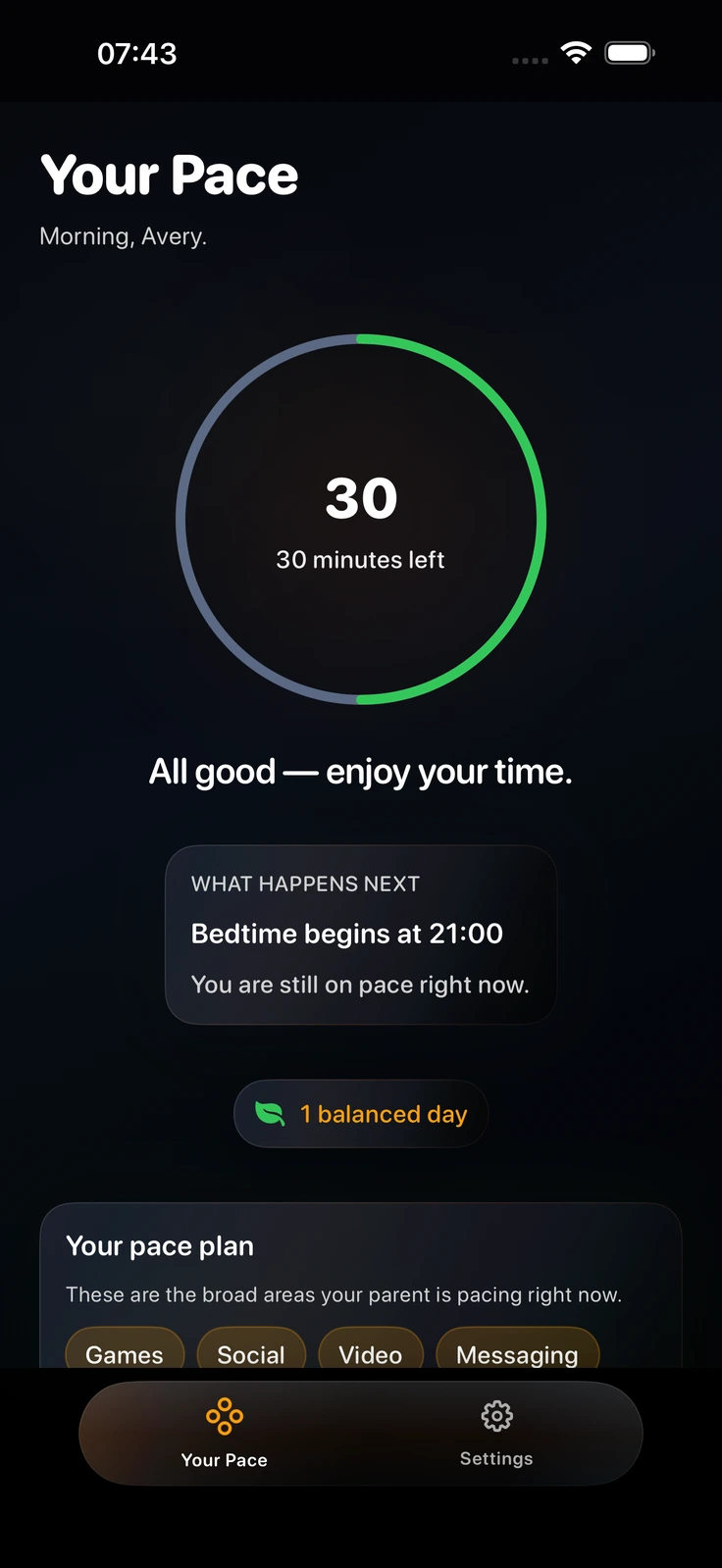
Children watch their remaining daily allowance wind down smoothly on an intuitive progress ring. No hidden counters or surprise shut-offs.
VISUAL PARENTING FOR KIDS
PaceOut gives children a live visual pace ring so they see remaining screen time throughout the day with clear warnings before supported limits are applied.

Requires iOS 17.0+ on iPhone & iPad · watchOS 10.0+ for Apple Watch
CHILD-CENTRIC DESIGN
A visible daily rhythm can make the next transition easier to understand.
Children watch their remaining daily allowance wind down smoothly on an intuitive progress ring. No hidden counters or surprise shut-offs.
Status colors change from vibrant Green to Amber and Calm Break as time draws short. Children naturally anticipate the end of screen time.
Set evening windows where device access gently transitions into bedtime routines. No late-night phone negotiations required.
SIMPLE 3-STEP FLOW
Set the rhythm once, link devices securely, and let the pace stay clear.
Parents open PaceOut to set daily allowances (e.g., 2 hours on weekdays) and select broad app categories to pace, such as Games, Social, Video, or Messaging.
Scan the secure family invite QR code on your child's iPhone or iPad. PaceOut links devices through Apple's official Family Controls framework and iCloud family sharing.
Your child sees their live daily pace ring whenever they unlock their device. They know exactly how much time remains and learn to pace their own entertainment.
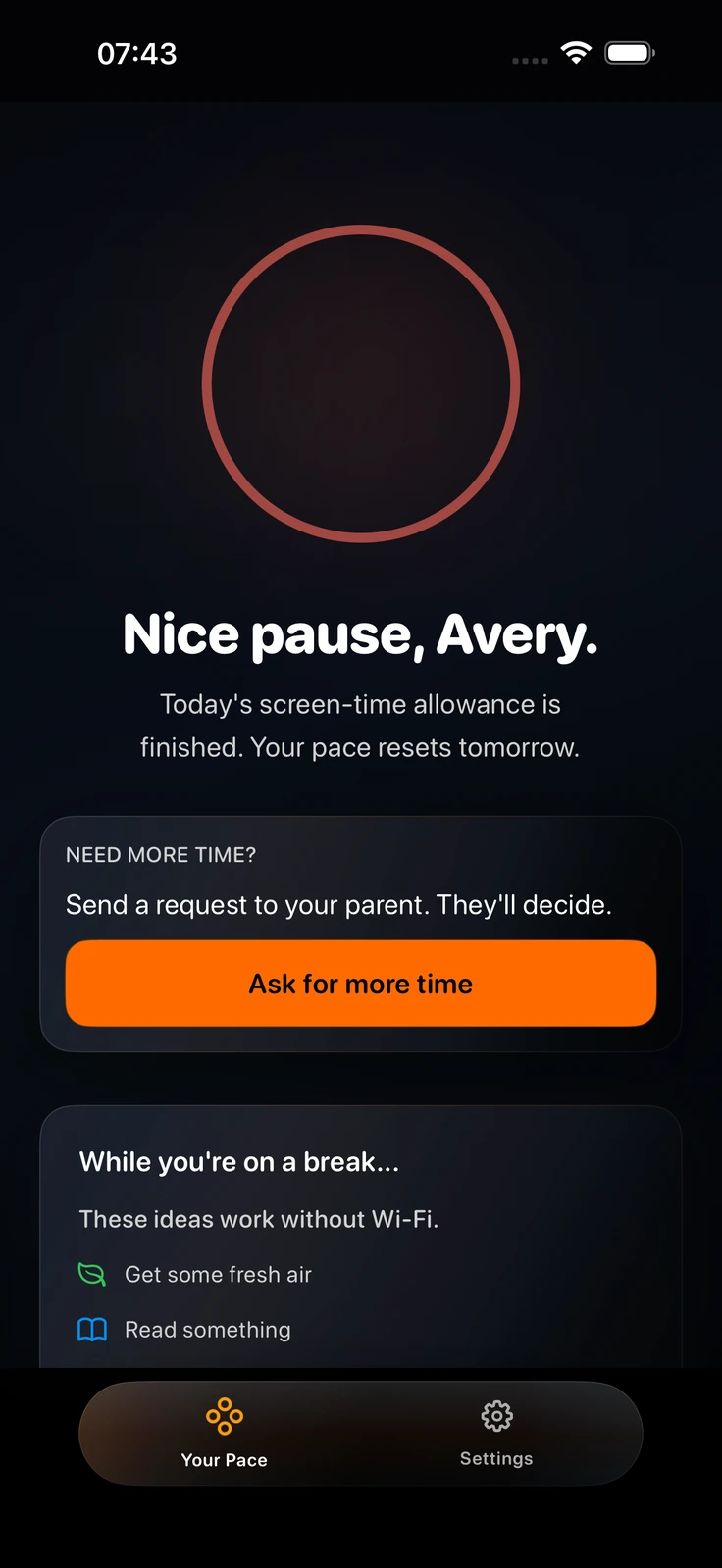
When daily allowance is completed, PaceOut transitions into a calm break state. Children see clear status messaging and know exactly when screen time resumes or bedtime begins.
CORE CAPABILITIES
Transparent features designed for Apple families.
Includes 1 child profile, daily allowance pacing, broad category selection, and bedtime wind-down windows.
Unlocks up to 5 child profiles, Remote Pause & Add Time (+15 min) when devices sync, 7-day history, split bedtimes, Apple Watch complications, and Siri Shortcuts.
PaceOut does not read or store specific app names, browsing history, or private messages. Built strictly with Apple Family Controls.
Requires iOS 17.0 or later on iPhone and iPad; watchOS 10.0 or later for Apple Watch integration.
QUESTIONS & ANSWERS
Helpful answers about how PaceOut supports children and parents.
Standard parental controls abruptly lock the screen without warning when time expires. This sudden cutoff creates frustration. PaceOut shows kids a live visual pace ring so they see time winding down naturally.
Children do not create an independent PaceOut account or provide an email address in the current flow. A parent creates the family relationship and shares a secure invite; the child-facing device can then receive the family information needed for the experience. Read the child privacy explanation for what may be visible to a parent.
No. PaceOut relies on Apple's official Family Controls framework to pace broad categories (Games, Social, Video, Messaging). In the current app architecture, specific app titles, messages, and browsing history remain on the child's device.
Yes. The Free plan supports 1 child profile with daily allowance pacing, category selection, and a basic bedtime wind-down window. Premium is optional.
Parent → ring → child
Download PaceOut free on the App Store and start with a clear daily rhythm.
Download free on App StoreiPhone & iPad · watchOS companion · No ads · No data selling